Given that you bought a DNS elsewhere, how do you connect it to your AWS resource
Using Route53
- Create a hosted domain in your route53 for your domain
(ex: askprometheus.com) - Copy the name servers, without the trailing
'.'s(ex: ns-1234.awsdns-01.org, ns-5678.awsdns-02.co.uk, etc.) - Update the name servers in your DNS provider dashboard
- Create records in your Route 53,
- If your service is running in an EC2, create an A record mapping to the EC2’s IP
- If it’s an alb, then create an Alias-A record map it to the alb resource
Once this is done, your DNS resolution, will have the following flow,
Someone enter's the domain name -> DNS Provider (GoDaddy, etc.) -> AWS Route53 -> service
The name server migration might take some time to complete (refer Ensuring mapping)
Getting HTTPS
- If you have already bought an SSL certificate, from your DNS provider dashboard, download the certificate and the private key
- In AWS certificate manager > Import a certificate > Paste the certificate and Private key > Import certificate > Copy the certificate ARN
- Create a https listener and pass the certificate ARN to it.
Example Terraform config using such an ARN,
resource "aws_lb_listener" "https" {
  load_balancer_arn = aws_lb.prometheus_arch.arn
  port              = 443
  protocol          = "HTTPS"
  ssl_policy        = "ELBSecurityPolicy-2016-08"
  certificate_arn   = "arn:aws:acm:us-east-1:..."

  default_action {
    type             = "forward"
    target_group_arn = aws_lb_target_group.prometheus_arch.arn
  }
}
Ensuring mapping
- To check status of DNS propagation globally: what’s my dns / dns checker
- From the cli use a tool like
nslookup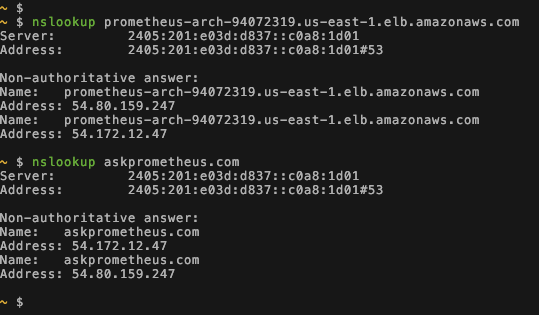
Refs
- Learnt it when connecting
askprometheus’s DNS to the ALB of myaskprometheusECS cluster